
Tap Hold
Free online tool — no signup required

Tap and hold to reveal.
Hide any image on X.

Tap Hold turns your picture into a transparent PNG that looks faint and empty in the X / Twitter timeline, then snaps into full color when someone taps and holds to enlarge it. Perfect for tap to reveal jokes, spoilers and surprise posts.

Works on x.comPNG8 exportMobile-friendly editor
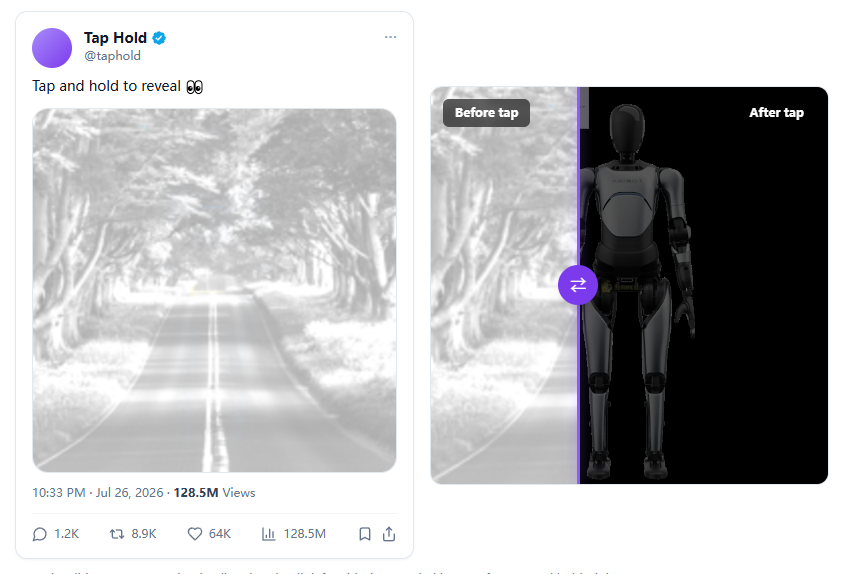
Before tap
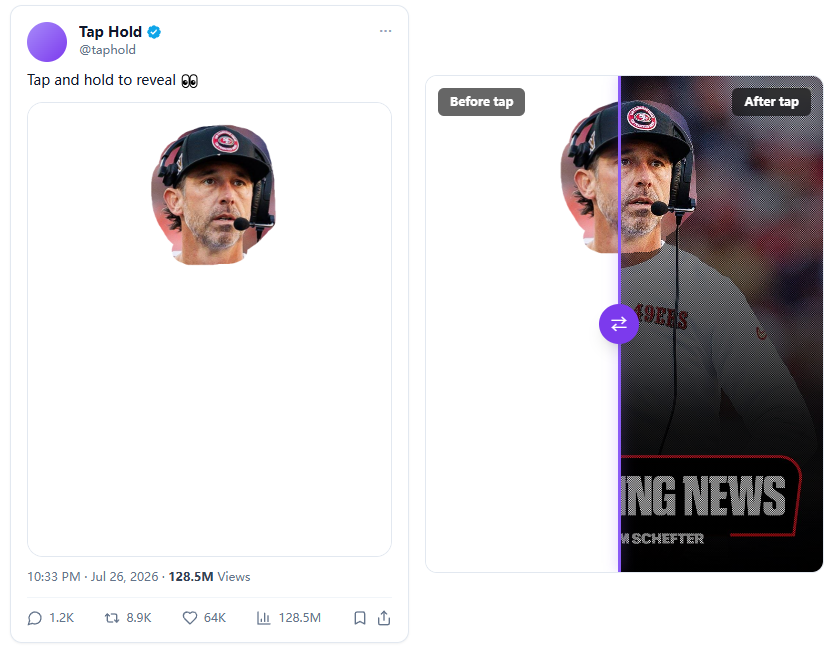
Before tap
After tap
After tap

Create your tap to reveal image

Upload a picture, paint the parts you want visible in the timeline, then download the PNG8 file and post it on X.

Drop your image here

or click to browse. Supports JPG, PNG, WebP up to 40MB.

Everything you need for a perfect tap and hold reveal

A focused set of controls that match how X actually renders images, so your hidden picture works the first time.

Upload any image

Drop a JPG, PNG or WebP file up to 40MB. The tool resizes it to the best dimensions for X / Twitter timelines.

Paint what stays visible

Use the brush to mark the areas that appear in the timeline thumbnail. Everything else waits for the tap.

Live before / after preview

Drag the slider to compare the faint timeline version with the image revealed after tap and hold.

PNG8 export

Download a lightweight indexed-color transparent PNG that X processes correctly for the tap to reveal effect.

Post on x.com

Upload the exported file from a desktop browser. The mobile app converts images to JPEG and breaks the trick.

Private & fast

All image processing happens in your browser. Nothing is ever uploaded to our servers.

How the X tap and hold trick works

Create a tap to reveal image in four simple steps. No account, no upload, no watermark.

Step 1

Upload your image

Drop any JPG or PNG into the tool. We resize it to the best dimensions for X / Twitter thumbnails.

Step 2

Paint what to hide

Brush the areas you want to keep secret. Everything under the mask becomes a transparent checkerboard.

Step 3

Preview the effect

Move the slider to see the timeline look versus what appears when a viewer taps and holds to enlarge.

Step 4

Post on X from desktop

Download the PNG8 file and upload it to x.com from a desktop browser. Mobile apps break the effect.

What is a Tap and Hold / Tap to Reveal image?

A tap and hold image — also called tap to reveal, click to reveal, an X hidden image or a kakushie (カクシエ, 隠し絵) in Japanese — is a transparent PNG that looks almost blank in the X / Twitter timeline and shows its real colors only when a viewer taps and holds to enlarge it.

Why does the trick work?

X generates a small thumbnail for every uploaded image. For transparent PNGs it flattens the picture onto a white background and shrinks it down. This tool splits the hidden parts of your image into a checkerboard of transparent and solid pixels. When X averages those pixels for the thumbnail, the result is a faint, washed-out picture that blends into the white timeline.

When someone taps and holds the image, X opens the original file on a black background. The transparent checkerboard pixels now read as black while the solid pixels show the brightened original colors, and the eye blends them back into the complete picture.

How to make a tap to reveal image

  1. Upload the picture you want to hide behind the tap.
  2. Paint any area that should stay visible in the timeline thumbnail (a teaser outline or a caption, for example).
  3. Adjust the output size, optional line art and brightness boost to fine-tune the preview.
  4. Download the PNG8 file.
  5. Post it on x.com from a desktop browser, wait 1–2 minutes, then check the timeline on mobile.

Why use this tap hold maker?

Most generic editors export RGBA PNGs, which X handles differently from indexed PNG8. This tool matches the encoding strategy used by the leading kakushie generators, so the hiding effect is reliable on both light and dark timelines. You also get a live preview, undo / redo and precise brush controls — without sending your image to a server.

Other names for this effect

People search for it as tap hold, tap and hold, X tap and hold, tap to reveal, click to reveal, X hidden image, Twitter hidden image, transparent PNG trick, kakushie or カクシエ. Whatever you call it, the payoff is the same: a surprise that only appears when someone interacts with your post.

Frequently asked questions

Quick answers about tap and hold / tap to reveal images on X.

It is a free browser tool that creates transparent PNG images which look faint in the X / Twitter timeline and reveal their full appearance when someone taps and holds to enlarge them. The effect is also called tap to reveal, click to reveal or kakushie.